Cryo: isolated by default
6 min read
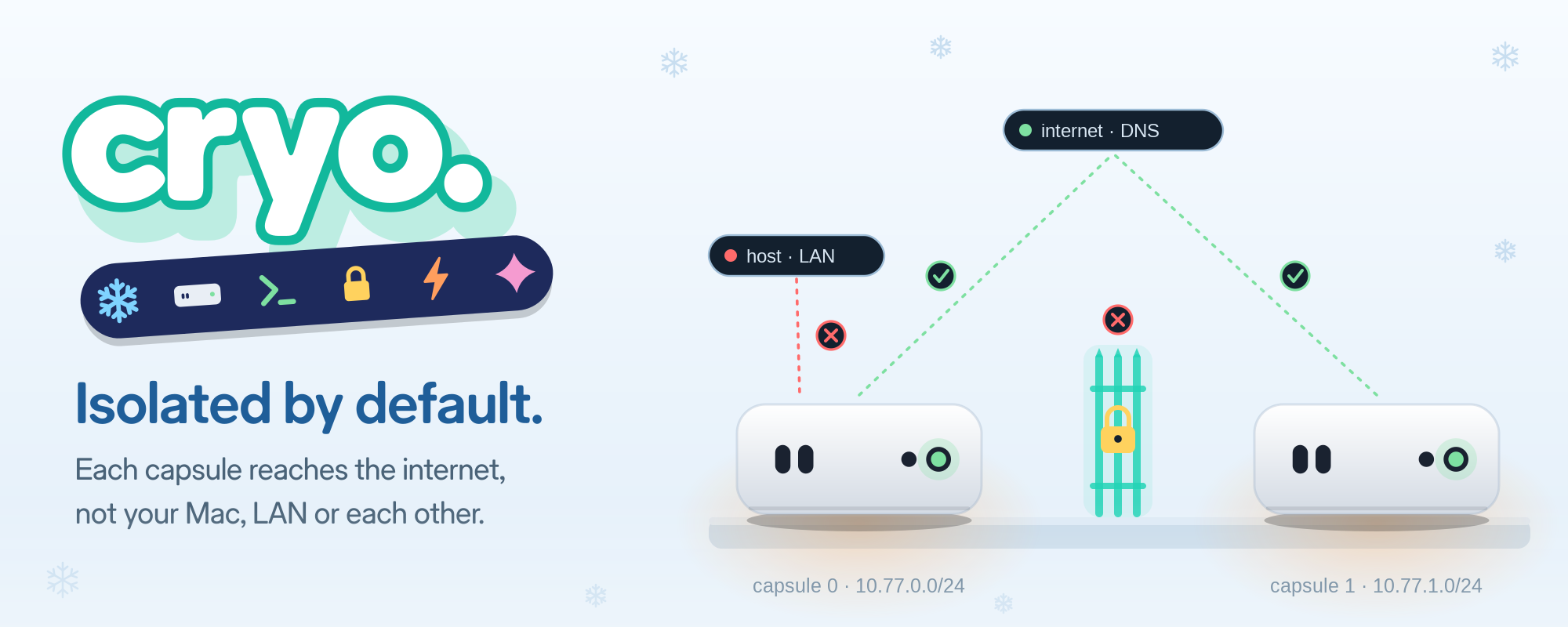
In the Cryo launch post I said isolation is the part I care about most. Here’s how it works.
The short version: a capsule can reach DNS and the internet. It cannot reach your Mac, your LAN or the other capsule. The agent never learns its IP address, and the SSH key it gets is useless once the lease ends.
Why it matters
My laptop has my keychain, my SSH keys, my browser sessions and every service I left listening on *. A coding agent runs commands on its own. Some of those commands come from READMEs, issues and packages I did not write.
A VM is a good start, but a VM on a shared network is still a machine on my LAN. It can scan the router, poke at the host, and talk to the VM next to it. So Cryo treats the network as part of the sandbox, not an afterthought.
One network per capsule
Each capsule gets its own vmnet network, made with Apple’s Virtualization framework:
capsule 0   10.77.0.0/24   gateway 10.77.0.1   guest 10.77.0.2
capsule 1   10.77.1.0/24   gateway 10.77.1.1   guest 10.77.1.2
The guest IP is pinned at .2 when the capsule is frozen, so it is the same on every thaw. There is no port forward. Early on I used vmnet’s port forward for SSH, and it turned out to listen on the LAN IP too, so any machine on my network could reach the guest’s SSH. That forward is gone. The host reaches the guest IP directly.
Two capsules on two networks cannot see each other at the network layer. That alone is not enough, though. In my first test, a vmnet guest could still reach my router’s web page and the host’s LAN IP.
The fence
The rest is a pf anchor. cryo bay install loads it into com.apple/cryo, which the stock /etc/pf.conf already evaluates, so Cryo never edits pf.conf. A root LaunchDaemon loads the rules again at every boot.
             ┌──────────────┐
             │   internet   │
             └──────▲───────┘
                    │ pass
┌───────────┐  DNS  │
│ capsule 0 ├───────┼──▶ 10.77.0.1:53   pass (its own gateway only)
└─────┬─────┘       │
      │             ├──▶ host LAN IP       blocked
      │             ├──▶ router, LAN       blocked
      │             └──▶ capsule 1         blocked
      ▲
      └── host → guest SSH (the bay only)
What the rules say, in words:
- A capsule may send DNS to its own gateway, and nothing else on port 53.
- A capsule may not send anything to a private address range: not the host, not the LAN, not the other capsule.
- Private sources may not reach a capsule, except the bay on the host itself.
Before and after the fence, from inside a capsule: the internet stayed reachable, DNS kept working, and the LAN router went from open to blocked. Leasing was just as fast with the fence on.
IPv6, now fenced too
The launch post listed one gap: the firewall was IPv4 only. That was issue #1, and it is fixed in 0.1.3.
The gap was real. The guest has no global IPv6, so the LAN and the internet were never reachable over v6. But the host’s vmnet bridge has an IPv6 link-local address, and from a lease I could reach host services on it that the IPv4 fence blocked: ControlCenter and the AirPlay receiver on ports 5000 and 7000, and rapportd. Anything on the host listening on all interfaces was exposed over IPv6.
Turning off router advertisements would not help, because the bridge’s link-local address does not come from them. The fix is to drop all IPv6 coming in on the vmnet bridges. macOS pf has no bridge interface group (on bridge loads fine and matches nothing), so the anchor lists bridge100 to bridge199 by name. After that, from a lease, ping6 and every one of those ports on the bridge’s link-local address were blocked, and the fence check script passes on my Mac.
The trade-off: other VM tools on the same Mac also lose IPv6 to the host on those bridges. For a Mac that runs Cryo, I think that is the right default.
Agents never see the IP
An agent does not get 10.77.0.2. It gets a name:
cryo lease          # L81 ready: ssh cryo-L81
ssh cryo-L81 'uname -a'
cryo-L81 is a Host block in an SSH config that cryo setup includes. Its ProxyCommand is cryo ssh L81, which asks the bay to connect and pipes the bytes through. So ssh, scp and rsync all work, but the agent never holds an address it could use for anything else.
A fresh key per lease
While a capsule refills, the bay makes a new Ed25519 key pair for the next lease and adds the public key to the guest. The guest also gets a new host key, and the lease hands that host key back to the client. The client writes it to a known_hosts file just for that lease, with strict checking on.
That means:
- The key in the agent’s hands works for one lease. After release the capsule is deleted, and the key opens nothing.
~/.ssh/known_hostsis never touched, and you never see a host key mismatch when a new capsule shows up at the same name.- Your own SSH keys never go near the VM.
And then it is thrown away
Isolation in space is half of it. The other half is time. Every lease gets its own copy-on-write disk. Release stops the VM from the host and deletes the lease’s folder. Whatever an agent installed, downloaded or broke is gone, and the next lease starts from the same frozen state.
What it does not do yet
- The Mac you run it on must be one you trust. The fence protects the host from the guest, not the other way around.
- The guest can reach the internet. There is no allowlist of domains. If you need one, put a proxy in front — Cryo doesn’t do domain filtering today.
- pf needs root once.
cryo bay installasks for one sudo prompt. The bay itself never runspfctl.
The rules are in the repo, and the capsule spec has the full network section: docs/spec/capsule.md. The code is at github.com/rizwankce/cryo.